PES Viver Studio: View & Export PES and eFootball 3D Models
Instructor: Viver softwar
⚽ PES Viver Studio
Nov 20, 2026 · @Alireza
🛠️ The all-in-one PES modding tool, from PES 6 to eFootball
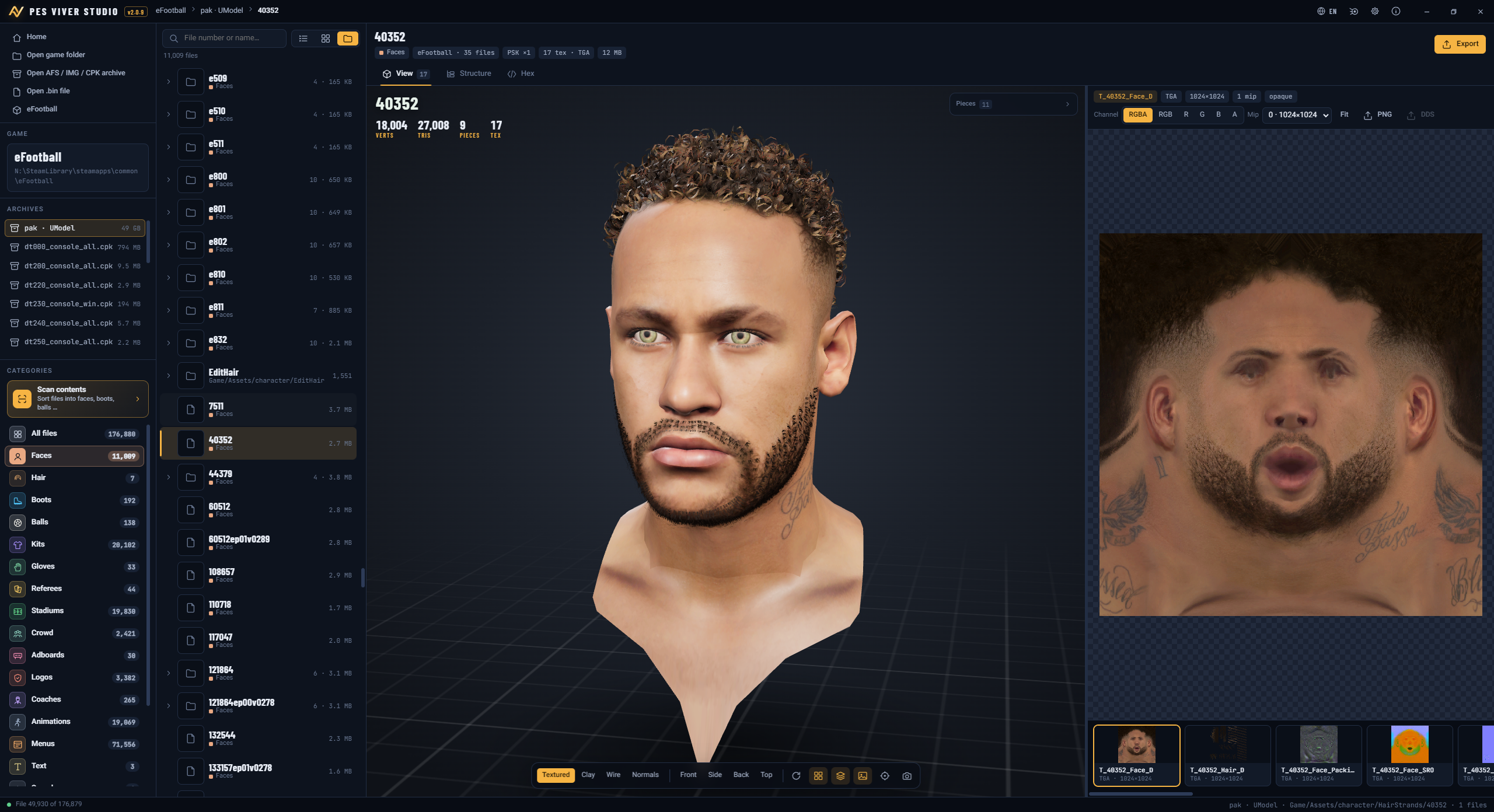
PES Viver Studio is a Windows app for PES modders, designers and fans. It opens the game's files and shows faces, hair, kits, boots, balls, stadiums and every other model in 3D with their own textures. You can export anything to common formats and use it in Blender or any other app.
🛡️ The app only opens and exports: it never writes into the game's files, so your game always stays safe.
📦 No installation and works offline: unzip it and run it.
🎮 Supported games
🕹️ Classic era
• PES 6 (also PES 5 and Winning Eleven 9, which use the same format)
• PES 2008
• PES 2009
• PES 2010
• PES 2011
• PES 2012
• PES 2013
🦊 Fox Engine era
• PES 2015
• PES 2016
• PES 2017
• PES 2018
• PES 2019
• PES 2020
• PES 2021
🚀 Unreal Engine era
• eFootball
🔍 The game version is detected automatically from its folder.
✨ Features
🧊 3D viewer
• Models shown with the game's own textures, normal maps and materials
• Textured, Clay, Wire and Normals view modes
• Front, side, back and top views, and auto-rotate
• Rotate, zoom and pan with the mouse
• Each part of a model can be switched on and off (face, hair, eyes, mouth …)
• Faces shown together with their own hair
🖼️ Texture viewer
• Separate colour channels (RGBA, RGB, R, G, B, A)
• Every mip level
• Size, format and transparency of each texture
📂 Categories and search
• Automatic categories, each with its own icon and colour: faces, hair, boots, balls, kits, gloves, coaches, referees, stadiums, crowd, logos, menus, animations …
• 🔍 Scan contents: sorts files more precisely by reading the files themselves
• PES 2008 and PES 2010 – 2013: when the game opens, every archive is sorted automatically in the background and faces are paired with their own hair; the result is remembered, so the next time it is instant
• Search by file number or name
• Gallery with a small preview of each item
• Very large archives open fast, even 11 GB cpks
• Structure and Hex views for a closer look at any file
🕹️ PES 6 and PES 2008 – PES 2013
• Opens AFS and IMG archives
• Faces, hair, boots, balls, kits and body models in 3D
• DDS and paletted (kit) textures
🦊 PES 2015 – PES 2021
• Opens the game's cpks and mod folders
• Faces, hair, boots, gloves, balls, kits, minifaces, coach photos, flags, menu pictures and stadium files
• Folder view: one row per player or boot, with all its files
• PES 2017: faces open with their own models and materials
🚀 eFootball
• 🔑 The encryption key is built in, so there is nothing to enter
• UModel comes with the app and the game folder is found automatically
• The full contents of the game's encrypted containers (pak, ucas, utoc), folder by folder
• One click exports any item and shows it in 3D
• Player and coach faces with natural eyes, hair and beards, plus kits, balls, crowd, stadiums, flags and banners, all with their own textures
• Folders exported with UModel or FModel open directly
• The cpks in the game's cpk folder open too
📤 Exports
🧊 3D models
• GLB (opens in Blender and most 3D apps)
• OBJ with PNG textures
🖼️ Textures
• PNG
• DDS
📁 Game files
• The original files, extracted with the game's own paths
• Raw or decompressed .bin files (PES 6 – 2013)
• PES 2017 face files uncompressed and ready to edit
• eFootball files: .psk models, .tga textures and materials, with their Game folder structure
📦 Batch export: every item of a category or a search at once
🧩 A Blender add-on comes with the app and opens PES models directly in Blender.
💻 Specs
• Windows 7 or newer, 64-bit
• Portable: no installation, no internet needed
• 🌍 Interface in 12 languages: English, Persian, Arabic, Turkish, Russian, German, French, Spanish, Italian, Portuguese, Indonesian and Chinese
• 🛡️ Read-only: the game's files are never changed
⚠️ Running it the first time: if Windows shows "Windows protected your PC", click "More info" and then "Run anyway". This only appears because the app has no digital signature.
🙏 UModel is made by Gildor (gildor.org).
- Level: Beginner
- Category: Game Modding & Editing
- Price: $10.99